
How to Fix Melting Housing on High Amp Socket in Welding Applications
You’re running a robotic welding cell, 400 amps, 12 hours a day. The robot cycles through its routine—weld, index, weld, index. Then someone on the line notices a smell. Burning plastic. The tech traces it to the high‑amp socket feeding the weld head. The housing is deformed, the plastic around the pin entry is discolored and bubbled. The line stops. Production loses two hours while the maintenance team scrambles to source a replacement.
Here‘s the thing about welding applications: they’re uniquely brutal on high‑current connectors. It‘s not just the continuous current. It’s the high‑frequency switching, the vibration, the metal spatter that embeds itself in plastic housings, and the constant thermal cycling that fatigues contact fingers. A PS Series High Current Sockets housing melting in a welding environment is rarely a mystery—the damage pattern tells you exactly what went wrong. This guide breaks down the four most common melting locations, what causes each, and how to fix them. No guesswork, just systematic diagnosis.
Melting at the pin entry area – spatter is the usual suspect
If the damage is concentrated right where the plug pins enter the socket—the plastic around each pin opening is melted, discolored, or pitted—start with the simplest explanation.
How spatter creates a thermal runaway
Weld spatter is molten metal that flies off the weld pool. Some of it lands on the socket housing, particularly around the pin entry openings. Those tiny metal particles embed in the plastic. Metal conducts heat far better than plastic. During the next weld cycle, the embedded spatter heats up rapidly under high current, transferring that heat directly into the surrounding housing material. The plastic softens, deforms, and in severe cases carbonizes. Each weld cycle adds more heat, and the damage accelerates.
Inspection and cleaning protocol
With the system isolated and locked out, use a magnifying glass or a microscope to inspect the pin entry area. Look for tiny metallic specks embedded in the plastic. If you find them, try removing them with a non‑metallic scraper or a soft brass brush—never steel, which scratches the housing and creates new stress points. For light discoloration with no structural deformation, cleaning and monitoring may be sufficient.
When to replace
If the plastic is visibly deformed—the pin entry openings are no longer round, or the housing surface shows bubbling or cracking—cleaning won‘t save it. The socket housing has lost its dielectric strength and mechanical integrity. Replace the entire socket assembly. And before you install the new one, address the spatter source: adjust weld parameters, add spatter shields, or reposition the socket further from the weld zone.
Melting around the locking ring or bayonet slot – incomplete insertion is the root cause
If the melting is concentrated around the locking mechanism—the bayonet slot or the threads where the plug secures into the socket—you‘re dealing with an insertion problem.
The arc that shouldn’t exist
High‑amp sockets are designed to carry current through the full engagement of the contact fingers against the plug pins. When the plug isn‘t fully inserted and locked, the contact area is reduced. The current tries to arc across the gap. That arc generates intense localized heat right at the locking ring interface. Over time, the plastic around the locking mechanism melts, deforms, and the plug can no longer lock securely—creating a vicious cycle of worsening connection quality.
In welding applications, vibration from the robot or the worktable can gradually back a plug out of its socket if the locking mechanism is worn. What starts as a small gap becomes a recurring problem.
Checking the locking mechanism
With the system isolated, insert the plug fully into the socket. Listen for the audible click or feel the positive stop that indicates full engagement. If the locking ring turns smoothly and stops at the correct position, the socket housing may still be salvageable. If the ring spins freely without a positive stop, or if it requires excessive force, the locking mechanism is compromised.
The fix – replace as a matched pair
A damaged locking ring cannot be repaired in the field. Replace the socket housing. More importantly, replace the plug as well—a worn plug locking mechanism will damage the new socket in the same way. These connectors are designed to work as matched pairs. Mixing a new socket with an old plug with worn bayonet slots is asking for a repeat failure. Hyper‘s PS Series offers replacement sockets and plugs with matching locking interfaces, so you can restore the connection to factory spec.
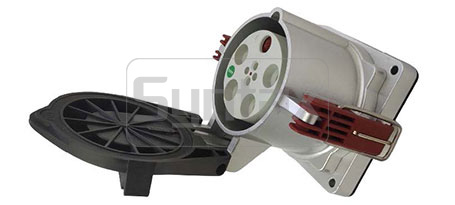
Melting at the cable exit end – bend radius is the hidden factor
If the housing damage is at the back of the socket—where the cable exits—the problem isn‘t the connection. It’s the cable.
How tight bends create hot spots
High‑amp cables generate heat from I²R losses. That heat normally dissipates through the cable jacket and into the surrounding air. But when a cable is bent too tightly at the socket exit, the conductors inside are compressed on the inside of the bend and stretched on the outside. The cross‑sectional area of the conductors effectively decreases in the bend, increasing resistance. Higher resistance means more localized heating. That heat travels back into the socket housing through the cable entry, softening and deforming the plastic at the cable exit end.
In welding applications, cables are frequently routed through tight spaces—under robot arms, through cable carriers, around workpieces. The bend radius at the socket is often the tightest point in the entire run.
The minimum bend radius rule
For high‑amp cables, the minimum bend radius is typically 8‑10 times the cable diameter. A 50mm diameter cable needs at least 400‑500mm of bend radius. Measure the actual bend radius at your socket installation. If it‘s tighter than the manufacturer’s specification, that‘s your root cause.
Fixing the routing
The solution isn‘t a new socket—it’s a new cable routing. Relocate the socket so the cable has a straight exit for at least 300mm before any bend. If relocation isn‘t possible, use a cable support or a strain relief that enforces a larger bend radius. For the damaged socket, if the melting is limited to the cable entry area and the pin contacts are still intact, replacing just the rear housing section (if your socket design allows it) may be sufficient. Otherwise, replace the entire socket and fix the routing before reconnecting.
Melting that is asymmetric – only one side is damaged
When the melting is on one side of the socket but not the other—one pin area is melted, the adjacent pin area is fine—you have a contact problem, not a general overheating issue.
The contact finger that lost its grip
Inside every high‑amp socket are contact fingers—spring‑loaded metal leaves that press against the plug pin to carry current. Over time, these fingers lose their spring tension from thermal cycling, oxidation, or mechanical wear. When a contact finger loses tension, the contact resistance on that pin increases. Higher resistance means more localized heating on that specific pin. The plastic around that pin melts while the rest of the socket remains intact.
A contact finger that has lost its tension will allow a small gap to develop between the finger and the plug pin. That gap becomes the site of micro‑arcing, which further degrades the contact surface and generates even more heat.
Diagnosing asymmetric damage
Look at the damage pattern. Is one pin entry area significantly more melted than the others? If yes, the problem is isolated to that contact position. Remove the plug and inspect the corresponding pin. Look for discoloration, pitting, or signs of arcing on the pin surface.
The fix – replace the contact set
You cannot repair a fatigued contact finger. The spring material has lost its temper. The only reliable fix is to replace the contact set—the entire set of socket contacts, not just the damaged one. Replace the mating plug pins as well if they show pitting or discoloration. On Hyper‘s PS Series sockets, contact replacement is a straightforward process: remove the old contacts, crimp the existing wires to the new contacts, and snap them into the fresh housing. Always replace all contacts in a socket as a set to ensure uniform contact pressure across all phases.
Below is a quick reference table for damage location, root cause, and repair action:
| Damage Location | Most Likely Cause | Repair Action |
|---|---|---|
| Pin entry area | Weld spatter embedded in plastic | Clean with brass brush; replace if deformed |
| Locking ring / bayonet | Incomplete plug insertion, worn lock | Replace socket and plug as matched pair |
| Cable exit end | Tight bend radius, cable stress | Reroute cable; replace housing if melted |
| Asymmetric (one side only) | Contact finger fatigue / loss of tension | Replace all socket contacts and mating pins |
| General / widespread | Overload or continuous over-rating | Verify load; upsize connector if needed |
Welding techs ask these questions about melted sockets
Q: Can I still use a socket with minor melting on the housing?
A: That depends on the severity. Minor surface discoloration with no structural deformation—you can still see the original shape of the pin entry and locking ring—may be safe to monitor. Clean the area, remove any spatter, and document the condition. Check it weekly. If the discoloration spreads or the plastic begins to deform, replace the socket immediately. A socket with any cracking, bubbling, or loss of roundness at the pin entry should be replaced. The housing is the primary insulation barrier; once compromised, the risk of phase‑to‑phase or phase‑to‑ground fault increases dramatically.
Q: Why does melting happen even when current is below the socket‘s 400A rating?
A: Current rating assumes a clean, fully engaged connection with uniform contact pressure. In welding applications, that ideal is rarely met. Spatter contamination increases contact resistance. Incomplete insertion reduces contact area. Contact finger fatigue creates uneven pressure distribution. Any of these conditions creates localized heating that can exceed the plastic‘s softening temperature even at currents well below the socket’s rated capacity. The socket‘s rating is the maximum safe current under ideal conditions—not a guarantee against failure in contaminated or worn conditions.
Q: Is there a type of high‑amp socket more resistant to weld spatter?
A: Yes. Sockets with recessed or shielded pin entries offer better spatter resistance than open‑face designs. Some manufacturers offer housings with spatter‑resistant coatings or higher‑temperature plastics. Hyper‘s PS Series sockets are built with durable, heat‑resistant housings and self‑cleaning lamellar contacts that maintain low resistance even under challenging conditions. For extreme welding environments, consider adding physical spatter shields or relocating the socket away from the direct spatter path. Prevention is always cheaper than replacement.
Summary of corrective actions by damage severity
Not every melted socket requires a full replacement. Match your response to the damage level.
Minor (surface discoloration only) : The plastic has changed color but retains its shape and structural integrity. Clean the area with a brass brush to remove any embedded spatter. Monitor weekly for progression. No immediate replacement needed, but address the root cause (spatter source, cable routing, insertion practice) to prevent escalation.
Moderate (dimpling or slight deformation) : The plastic surface shows indentations or minor warping. The pin entry openings may be slightly out of round. Replace the housing or the entire socket, depending on your socket design. Do not attempt to “reshape” a deformed housing—the dielectric strength has been compromised.
Severe (carbonization, cracking, or full melting) : The plastic is blackened, cracked, or melted to the point where pins are exposed or the locking mechanism no longer functions. Replace the entire socket assembly and inspect the mating plug for damage. Replace the plug contacts as well if they show signs of overheating. Do not attempt to patch or repair a carbonized housing—the material has lost its insulating properties permanently.
Before you install the replacement, take thirty minutes to address the conditions that caused the failure. Move the socket away from the spatter zone. Verify cable bend radius meets specification. Train operators on proper plug insertion and locking. A replacement socket installed under the same conditions will fail the same way.
Dealing with melted sockets in your welding line? Contact Hyper for a welding‑environment socket assessment. Share your current socket model, amperage, duty cycle, and damage pattern—their technical team can recommend the right PS Series socket configuration and spatter protection options for your specific application.